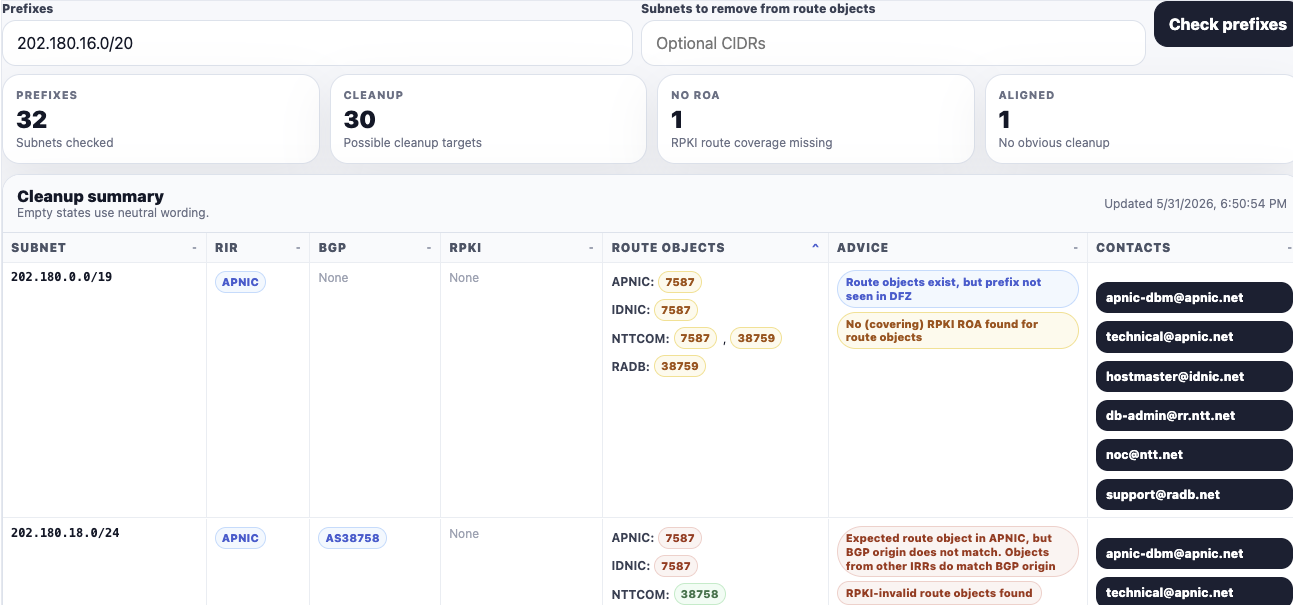
Working through the Internet Routing Registry can be complicated. We have worked closely with the source registries over the years to develop a better method to properly clean up old route records.
If you prefer to try to tackle this project on your own, please follow the directions to remove all routing objects, announcements and BGP records for your IPv4 block
Open up IRR Explorer, and search the IPv4 block you want to transfer. You will likely see several listings on this page. If your entire IPv4 block is listed, including what you want to transfer out, you will want to clean up the records.
The columns will have several listed source registries that are hosting routing records. Some examples of source registries are: arin, radb, level3 and nttcom.
Removing Legacy Route Objects
If the message under the advice column says Not seen in BGP, but (legacy?) route-objects exist, consider clean-up , do the following:
- Open up IRR Explorer
- Input your IPv4 Address into the Prefixes search. This will show you all of the subnets that have existing route records.
- If you want to remove route records for a specific IPv4 address, input it into Subnets to remove from route objects
- On right side side, Click the email address of the source registry for the route objects you want removed. (This email will include all of the route object details they will need for removal. The email must be sent from a contact listed on your internet registry for verification).
To get assistance from our team, please email info@staging.brandergroup.net or contact us
Removing BGP Announcements
In IRR Explorer, if it says Prefix in DFZ, but no route-object with correct origin anywhere or Looks good: BGP origin consistent with AS in route-objects
- Reach out to your upstream internet provider and ask them to stop announcing it. You will see the ASN listed next to the record, which you will need to reference in email.
- You can look up the contact details for the upstream provider here
- bgp.he.net
- input AS# into search
- in the tabs, click on Whois in the far right